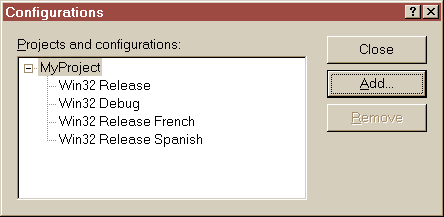
If your application must be released in several language versions, you can manage a different resource script for each language, and decide at link time wich resource set is to be used. Here is the way to do it with Visual C++ 6.
A project can handle only one resource script (.rc) in a given Project Settings Configuration. Therefore, you have to create a Configuration for each language your product is going to support.
Copy your resource script (.rc) for each language.
Example :
copy MyProject.rc MyProject_French.rc
copy MyProject.rc MyProject_Spanish.rc
They all include the same resource.h.
The problem is that whenever you change something in a resource with the resource
editor, Visual C++ 6 saves a new version of the resource header resource.h.
Yet we don't want this file to be changed while translating resources. There
is a way to specify to the editor that some symbols are read-only. We will tell
that the resource.h is entirely read-only.
Copy the resource header resource.h for each language.
Example:
copy resource.h resource_French.h
copy resource.h resource_Spanish.h
Edit (with notepad) each new resource script to change the included header file :
Example :
in MyProject_French.rc
change #include "resource.h"
to #include "resource_French.h"
Add new rc and h files to your project : Menu Project \ Add to Project \ Files...
The editor tells you that you can't have several resource scripts, and that
the new ones will be ingored during build.
What it doesn't say is that they will be ignored in the current configuration.
In the Resource View of the Workspace window, right-click on each resource folder and select Resource Includes...
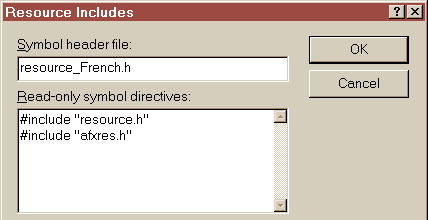
Change the name of the resource header
for the language, and add the read-only directive
:
#include "resource.h"
Now, all your new resource header files become useless, since the symbols are actually defined in the common resource.h.
In the menu Project \ Settings... do for all new configuration :
in the project's General tab : set the Output and Intermediate directories as in the standard Release configuration.
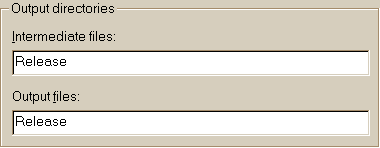
This way, when one version is built, the building of another one is actually only a linking.
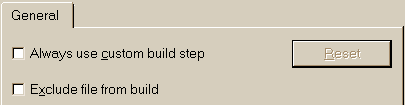
In the .rc Source files folder : exclude from build every rc file but the one of the given language.
First release : Oct - 26 - 1999.
Last update : Oct - 28 - 1999.